Bones
Physical bones
- The model requires at least 2 physical bones for physical bodies: one for the body of the truck, and one for the chassis of the truck.
- All physical bones must have collision meshes attached to them, so their names typically should have the
_cdtsuffix to highlight that:BoneChassis_cdtandBoneBody_cdt.
Non-physical bones
- The wheels require non-physical bones, one bone per wheel.
Bone hierarchy
The configuration of a typical set of bones:
- Сhassis bone — bone with the attached chassis collision mesh.
- Must be a root bone.
- Located at the world origin:
(0;0;0). - Oriented along the Z‑axis.
- Truck body bone — bone with the attached body collision mesh.
- Wheel bones — each positioned at a wheel spawn point.
Note
Apply the Rotation and Scale for Body and Armature to make sure the model is exported properly. It is recommended to apply geometry transforms before attaching components to Armature. To do so, select the component, press Ctrl+A, and select Rotation and Scale.
Example
In tuz_119lynx_mod.blend the BoneChassis_cdt bone is the root bone of the truck.
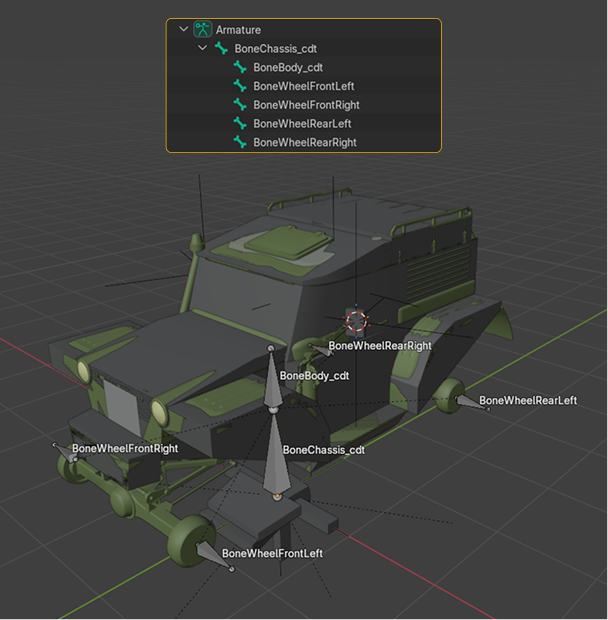
BoneChassis_cdt — physical bone of the chassisBoneBody_cdt— physical bone of the truck bodyBoneWheelRearLeft— non-physical bone for respective wheelBoneWheelRearRight— non-physical bone for respective wheelBoneWheelFrontLeft— non-physical bone for respective wheelBoneWheelFrontRight— non-physical bone for respective wheel
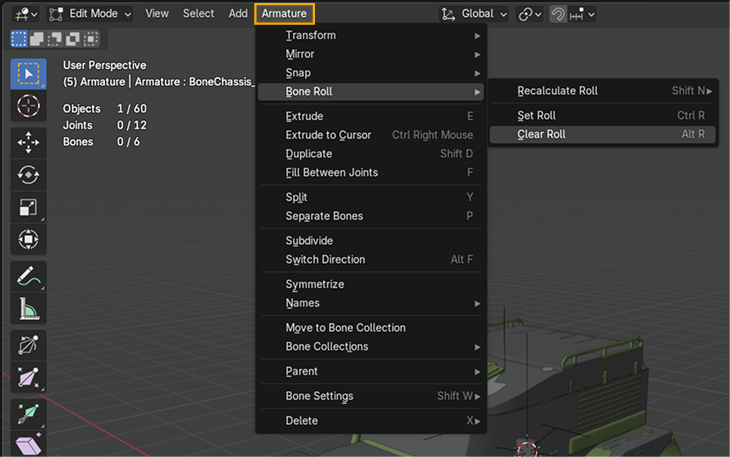
Optional: After creating the bone hierarchy, you can reset bone rolls to ensure consistent orientation. It helps to prevent potential issues with object rolls after parenting. To do so:
- Select Armature and switch to Edit Mode.
- In toolbar select Armature > Bone Roll > Clear Roll
Info
It is a good practice to make the positions of some bones symmetrical. To specify the position of bones precisely, you can use Blender's 3D Cursor and its snapping mechanics (Shift+S opens the snapping menu). You can also use the Symmetrize tool for Armature.
Additional components
Complex mods might also require the following components:
- A set of bones for inverse kinematics (
<AutomaticIK>) to make the movement of the truck more realistic on the rugged terrain. - A bone and a mesh for the steering wheel (
<SteeringWheel>). - Additional bones for front and rear axles.
- 3 bones for the steering rack.